What Wearables and Fitness Apps Can Be Integrated with Peloton?
The Benefits of Syncing Your Wearables and Fitness Apps with Peloton
How to Sync Your Wearables and Fitness Apps to Peloton
You’re crushing in-person fitness classes, logging miles on outdoor runs, and moving in all sorts of ways throughout the day. You may not always be working out with Peloton, but you’re clearly working hard. That’s why we’re introducing new data integrations with wearables and fitness apps, so all your movement is tracked in one place. Read on to learn about all the perks of connecting with Peloton, and the easy steps to take to get started.
What Wearables and Fitness Apps Can Be Integrated with Peloton?
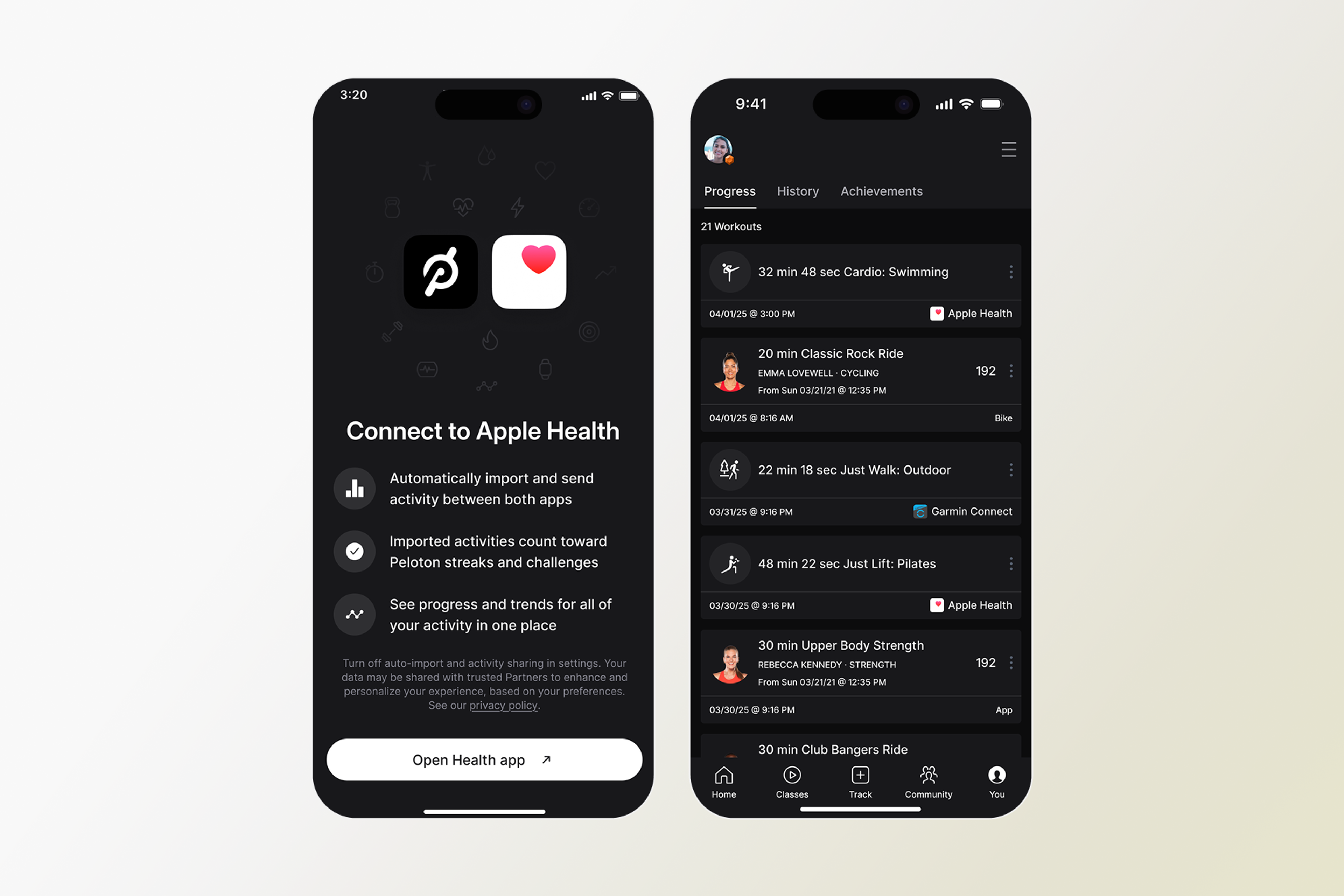
You can now sync your Peloton profile with Apple Health, Garmin Connect, and Fitbit. Setting up these data integrations allows your activity data to be shared with Peloton—and for Garmin device users, syncing to Garmin Connect through the Peloton App will automatically send Peloton workouts to Garmin Connect. That means your completed workouts outside of Peloton count toward metrics like your activity calendar, total activity count, Personalized Plans, activity goals and certain activity Challenges. Workouts completed outside of Peloton will not count for Streaks, milestones (i.e. 100 rides), and certain challenges.
The Benefits of Syncing Your Wearables and Fitness Apps with Peloton
Linking your preferred wearable or fitness app isn’t just a way to capture when and how you’re moving. Here are some of our favorite perks of syncing this data with Peloton.
Unified Fitness Hub
You took a Peloton stretching class in the morning, went for an outdoor walk on your lunch break, and powered through an in-person cardio class in the evening—but the fitness data from all this activity is spread out across different apps and trackers. Not anymore! With these integrations, you’ll get a better picture of your overall activity all in one place. Plus, data from your connected app or wearable will count towards those activity trends in the Peloton App that you love—like time and distance trends and 30-day stats. That way, Peloton can be the central hub for all things fitness, wherever you get your movement in. Alternatively, if you use a Garmin device, you can auto-send Peloton activities (such as cycling, running, and strength) to Garmin Connect, which will allow your activities, with heart rate data, to impact advanced training metrics on compatible Garmin devices, including Training Status, Recovery Time, and Load, to count toward your Garmin goals.
Credit for Your Work
You deserve the rewards for staying consistent, no matter how you choose to do it. Whether you take a Peloton class, use another app that’s integrated with your wearable, or do your own thing, any and all activity from your connected wearables and fitness apps will get you credit for certain Peloton Challenges, like your Annual Activity Challenge. Part of a Peloton Team? You’ll also get credit in Team Challenges, the Team Leaderboard, and in your Team feed. Workouts completed outside of Peloton will not count towards Streaks and certain challenges.
Smarter Insights
Everyone is different, and with integrated wearables, you’ll get even better suggestions for workouts tailored to your specific goals and needs. The data from your fitness apps and wearable trackers will help inform your Personalized Plan, Peloton class recommendations, and personalized insights. You’ll get a better picture of what you need to do to get faster, stronger, or work towards whatever goal you’re aiming for!
How to Sync Your Wearables and Fitness Apps to Peloton
Before getting started, make sure your Peloton App is updated to the latest version. Ready to go? Follow these simple steps to get your wearable or fitness app synced with Peloton, then show us what you got.
Apple Health
Open the Health App on your iOS device and select Sharing.
Select apps, then scroll to find Peloton.
Pick which activity categories Peloton can access. (“Read” access allows Peloton to pull activity from the Health app into the Peloton App, and “Write” access will import your Peloton workouts to show in the Health app.)
Garmin Connect
In the Peloton App, navigate to the Profile tab in the bottom right corner.
Select the “More” menu in the top right corner, then scroll down to Add-ons.
Select Garmin Connect under Permissions.
Follow the on-screen instructions to sync your Garmin with the Peloton App.
Fitbit
In the Peloton App, navigate to the Profile tab in the bottom right corner.
Select the “More” menu in the top right corner, then scroll down to Add-ons.
Select Fitbit Connect under Permissions.
Follow the on-screen instructions to sync your Fitbit with the Peloton App.


Within the Peloton App, you’ll be able to adjust your settings for what data you share and what activities are imported or exported. Here are a few things to keep in mind:
You can choose to auto-import activities, which will automatically pull your workout data from your fitness app or tracker into your Peloton Workout History. Or within Peloton’s Garmin Connect Settings, you can toggle “Write to Garmin Connect” to auto-export Peloton workouts to your Garmin.
You can select specific activities to auto-import or leave it without personalization to capture all your workout data.
You can turn off auto-import entirely and manually choose which workouts to count. Visit your wearable settings in the Peloton App to view all your activity from the past seven days, then select the specific workouts to add.
If you connect multiple apps or wearables, Peloton will automatically check to prevent duplicates. If a workout has already been recorded on Peloton or imported another app and we detect a duplicate, only one copy will be saved in your Peloton Workout History.
If you don’t see a workout in your Peloton App, select the + button from your Peloton Workout History to add it manually.
No matter what wearable you use, connecting it with Peloton can help you get even more out of your Membership. Try out the new integrations today to start leveling up tomorrow.
Read our privacy policy here.
This content is for informational and educational purposes only and does not constitute individualized advice. It is not intended to replace professional medical evaluation, diagnosis, or treatment. Seek the advice of your physician for questions you may have regarding your health or a medical condition. If you are having a medical emergency, call your physician or 911 immediately.
Level up your inbox.
Subscribe for a weekly dose of fitness, plus the latest promos, launches, and events.
By providing your email address, you agree to receive marketing communications from Peloton.
For more about how we use your information, see our Privacy Policy.